
A research workflow built around the right-click menu.
For students, journalists, analysts, and anyone who reads in tabs — a browser extension that turns every highlight into a research move.
The problem with reading in tabs
Research isn't one search. It's a phrase you don't know, a name you want to verify, a date you want to cross-check, a quote you want to attribute, a study you want to find the original of. The traditional workflow — copy, open new tab, paste, search — was designed for one query at a time on one engine. Real research is many queries on many engines, all sparked by something you just read.
A research set, ready to go
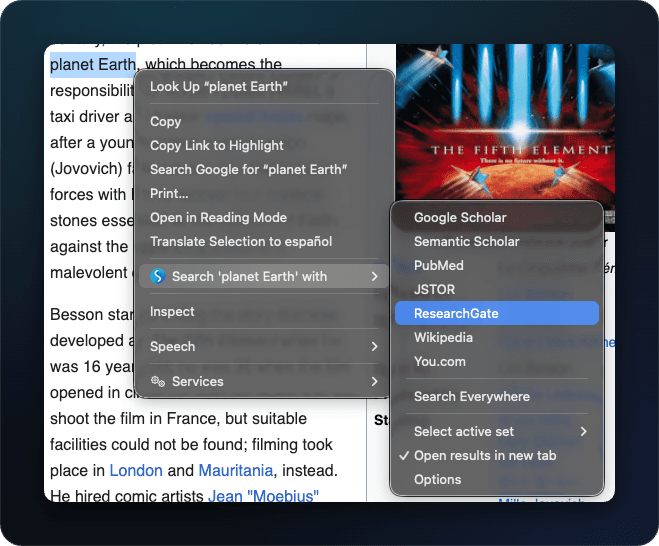
Inside Simple = Select + Search, you can create a dedicated "Research" set with the engines that match how you actually work. A common starting point:
- 01Wikipedia — context, definitions, follow-up citations.
- 02Google Scholar — peer-reviewed sources for any name, term, or quote.
- 03JSTOR, PubMed, arXiv (pick what your field uses) — primary literature.
- 04Google or DuckDuckGo — the catch-all, for finding the original page a quote came from.
- 05A fact-checking site — Snopes, Reuters Fact Check, or a domain-specific one.
Highlight any term you're reading, hit "Search everywhere" from the right-click menu, and all of those engines open in parallel. You spend the next thirty seconds tabbing through real sources rather than typing the same query five times.
For students
Reading an assigned paper, you hit a name, a battle, a theorem, a concept. One right-click — and you have Wikipedia for context, Scholar for the original literature, and a regular search for everything in between. Citations stay traceable; your reading flow doesn't break.
For journalists and analysts
Names, places, and dates need verification. A multi-engine set lets you run the same selection through your primary sources without losing the page you're sourcing from — open in new tabs, original page stays put. Add a fact-check engine, an archive (e.g. Wayback Machine), and a domain-specific database and the right-click menu becomes a desk reference.
For researchers and academics
Build sets per field — one for medicine (PubMed + Cochrane + UpToDate), one for physics (arXiv + INSPIRE + Wikipedia), one for the humanities (JSTOR + Project MUSE + Internet Archive). Switch sets from the toolbar; the right-click menu reshapes around the kind of research you're doing right now.