
Send selections straight to ChatGPT, Claude, and Perplexity.
Highlight a paragraph, a snippet, an error message, a clause — and pipe it into any AI tool through the right-click menu. Build an "AI prompts" set and fan one selection out to several models at once.
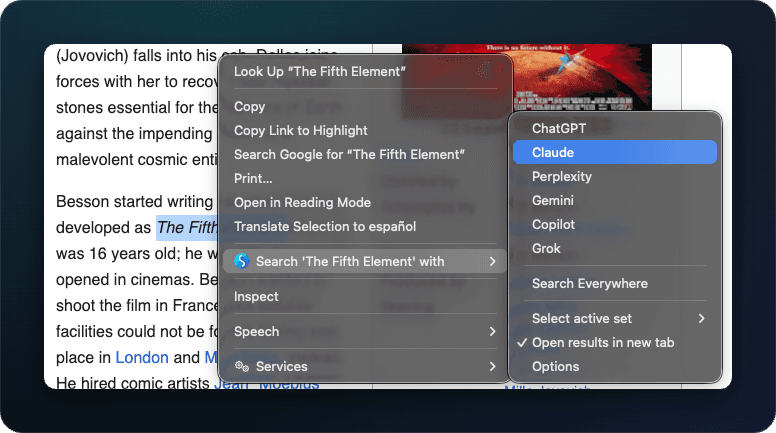
The AI-era browsing workflow
Most AI tools live in a separate tab. The friction of switching to that tab, pasting in what you were just looking at, and adding a question breaks reading flow. Right-click search collapses that into one motion: the selection is the prompt, and any AI tool that accepts a query in its URL becomes a context-menu target.
Building an AI prompts set
Create a dedicated set in the Options page — call it "AI" or "Prompts." Add the AI tools you actually use. Common picks:
- ChatGPT — general-purpose, broad knowledge.
- Claude — long context, careful reasoning.
- Perplexity — search-grounded answers with citations.
- Phind, Cody, or You.com — for code-heavy or developer-focused workflows.
- A search engine — Google or DuckDuckGo, so you can cross-check the AI answers against actual sources in the same motion.
Each AI tool is added as a custom search engine — see custom search engines for the %s-based setup.
Comparing AI answers side by side
When the AI set is active, picking "Search everywhere" from the right-click menu sends your selection to all your AI tools at once. Each opens in its own tab; you tab through and read three or four answers in parallel. For anything serious — a code snippet, a tricky clause, a research claim — that's far more reliable than trusting one model.
Privacy
The text you search never leaves your browser — your selection goes straight to the AI tool's URL, and the extension never sends it to us. It does count feature usage (the domain of the engine you used, your browser language — never the query itself), and never logs what you search or the sites you visit. See the transparency page for the full breakdown.
Recipes
- Code on the page → AI explanation. Highlight a function, ask the AI set to explain it. Three opinions, one right-click.
- Error message → AI debugging. Highlight the stack trace, send to your dev-flavored AI set. Combine with multi-search that also includes Stack Overflow.
- Foreign phrase → translation comparison. Build a set with two AI tools and a dictionary; one highlight gives you a cross-check.
- Legal or contract clause → AI plain-English summary. Highlight, send to your AI set. Always cross-check with a regular search.